Mutable Instruments Stages / v1.1 / formerly Qiemem Bribery Edition
BRIBESTAGES
qiemem's bipolar multi-mode firmware v1.3.0 with three additions: segment linking from the buttons, Follow segments, an envelope follower on any segment, and Sync LFOs, a bank of LFOs locked to one clock. Everything qiemem's firmware does still works.
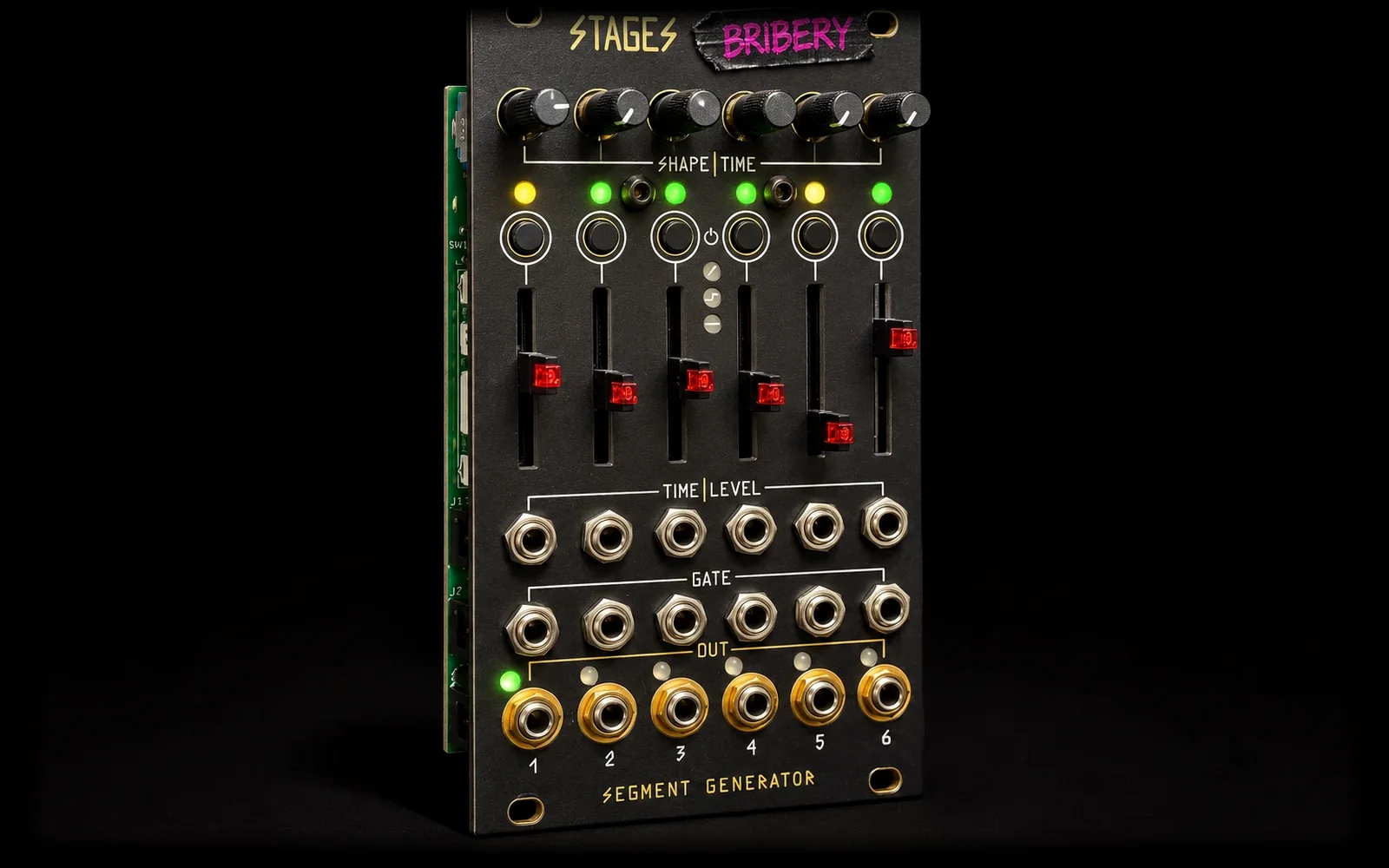
Why
Built for playing live.
Groups that stay put
On stock Stages, the gate jacks decide how segments group together. Playing live, a cable going in or out in the middle of a set would split or merge envelopes without warning. Linking sets the groups with the buttons, so the patch can change without the envelopes changing.
A follower in the case
Stages segments can already read audio through their CV jacks, so any segment can now be an envelope follower, without giving up a module for one.
LFOs on one clock
Sometimes you want several LFOs that move together, a slow one and a fast one on the same beat, without multing a clock out to every gate jack. Sync LFOs take one clock into the first segment and give every linked segment its own LFO at its own division or multiple, all locked to it.
Linking
In the Stages, Advanced and Slow LFO modes, with a single module. Links are stored.
- Hold A, tap B
- Links every segment from A to B. Triple green flash. Works right to left too. If they're already linked, sets a loop from A to B, same as stock.
- Hold A, hold B for 2 s
- Unlinks: every segment from A to B stands alone. Triple red flash. Unlinking the middle of a group splits it in two.
- Short press
- Changes segment type. The link stays.
- Hold 0.5 s, release
- Toggles loop (qiemem timing).
- Hold 5 s, one button
- Mode change, as in qiemem. With two buttons held, mode change is blocked, so a long link gesture can't switch modes by accident.
- Hold + slider or pot
- qiemem's property changes, unchanged.
Gates and outputs
- A group comes out of its leftmost segment's output.
- The leftmost segment's gate fires the whole group.
- Gates patched into the other segments of a group are ignored, so patching them doesn't split or restart it.
- A segment that isn't linked follows its own gate.
Free-running groups
- With no gate in the first segment, a looped group runs by itself, like a multi-stage LFO.
- A group without a loop waits for a gate.
- Linked segments do a quick triple yellow flash every 4 seconds, over their normal colours.
Follow
Patch audio into a segment's CV jack and its output becomes the envelope of that audio.
Making one: tap the segment's button past the last type. Stages and Slow LFO modes: ramp, step, hold, follow, sync LFO. Advanced mode: ramp, step, hold, random, follow, sync LFO.
- CV jack
- Audio in. DC is blocked, so an offset doesn't read as level.
- Slider
- Release, 5 ms at the bottom to 5 s at the top.
- Pot
- Attack, instant fully left to 250 ms fully right.
- Hold button + slider
- Input gain in four zones, bottom to top: x1, x2, x4, x8. At x1 a 5 V audio peak gives full output. Use x4 or x8 for line-level sources.
- Hold button + pot
- Invert: the envelope goes negative, 0 V down to -8 V.
- Gate jack
- High freezes the envelope where it is. Low lets it follow again.
- Output
- 0 to 8 V, or 0 to -8 V when inverted.
- Lights
- The button light is a level meter: green, then yellow, then red as the input gets louder. With no sound it breathes dim yellow (dim red when inverted). The slider light follows the output.
Good to know: a Follow segment always stands alone; links into or out of it are kept and come back when you change its type. With a very short release, low notes ripple, so raise the release to smooth it.
Sync LFO
One clock in, a bank of LFOs out. Link a few Sync LFO segments and each one sends its own LFO, all locked to the clock in the first segment's gate.
Making one: tap the segment's button past Follow. Stages and Slow LFO modes: ramp, step, hold, follow, sync LFO. Advanced mode: ramp, step, hold, random, follow, sync LFO. Then link them as usual: hold the first, tap the last.
Example: clock into segment 1's gate, make segments 1 to 4 Sync LFOs, hold button 1 and tap button 4. Four LFOs come out of outputs 1 to 4, all on that clock. Set one to x1, one to x2, one to /4 and they stay in step for as long as the clock runs.
- Gate jack, first segment
- Clock in. Each rising edge is one clock period. Gates in the other segments of the group are ignored.
- Slider (plus CV)
- Rate against the clock: /32, /16, /8, /6, /4, /3, /2 in the lower half, x1 in the middle, x2, x3, x4, x6, x8, x16, x32 in the upper half.
- Pot
- Shape, morphing from sine to triangle to saw (falling) to ramp (rising) to square to random. Random picks a new level every cycle and holds it.
- Hold button + pot
- Bipolar: -5 V to +5 V instead of 0 to 8 V.
- Hold button + slider
- Phase offset in four zones, bottom to top: 0, 90, 180, 270 degrees. Two LFOs at the same rate, one at 90, make a quadrature pair.
- Output
- That segment's own LFO: 0 to 8 V, or -5 V to +5 V bipolar.
- No clock
- The LFOs keep going at the last tempo (120 BPM before any clock arrives). When the clock starts again after a stop, every LFO restarts from the top, so divisions line up with the first clock.
- Lights
- The button flashes at the start of every cycle: green when it multiplies the clock, yellow at x1, red when it divides. Between flashes it's dark, or a dim glow when bipolar. While setting the phase: green 0, yellow 90, red 180, red and green 270. The slider light follows the LFO.
Good to know: a Sync LFO only links to other Sync LFOs; a stored link to another type is kept but ignored. A Sync LFO on its own is a group of one, clocked by its own gate. In 6EG and Ouroboros modes, or with two Stages chained, it runs as a ramp.
Update
Stages updates from audio. Its updater is built in and can't be damaged by a failed attempt.
You need: a computer or phone with a headphone jack (a wired USB headphone adapter works, Bluetooth doesn't) and a 3.5 mm patch cable. Play the file below from this page, or download it and play it in any player.
- Power the rack off. Unplug every cable from the Stages.
- Patch the headphone out into the CV input of the rightmost segment (top row of jacks).
- Set the rightmost slider to the middle. It sets the input gain.
- Hold the rightmost button and power the rack on. The rightmost slider light blinks green: the module is waiting for audio.
- Set the volume high. Turn off sound effects, EQ and notifications. Unplug speakers and headphones: the update sound is harsh.
- Play the .wav from the start. The six button lights are a level meter: 3 or 4 lit is right. Move the rightmost slider to get there.
- Green slider lights run left to right while it loads. It takes about 80 seconds, then the module restarts on the new firmware.
All six button lights blink red? The level was too low or the audio cut out. Press the rightmost button, raise the gain with the rightmost slider and play the file again from the start. Upside-down module: use the flipped file, with everything mirrored (leftmost segment, button and slider). Coming from qiemem v1.3.0, your segment types and mode are kept. To go back, flash qiemem's v1.3.0 release the same way.
Source
MIT licensed, with host tests that run the real firmware code.
The full source, build steps and the qiemem docs for everything else live on GitHub.
Stages and its code: Emilie Gillet, Mutable Instruments. Multi-mode firmware: joeSeggiola. Bipolar firmware: qiemem. Linking, Follow and Sync LFO: Bribery. Unofficial firmware, not made or supported by Mutable Instruments.